


Milwaukee Journal Sentinel
2.3386.00 Reviews
App Specs
- Version
- 8.10.3
- Updated On
- License
- Free
- Downloads
- 50,000+
- Developer
- USA TODAY Co.
- Categories
- News & Magazines
- Platform
- Android
Screenshots





 Analysis by AppCompare
If I were choosing a news app for someone who wants a reliable sense of what is happening around Milwaukee, I would first ask how they actually read the news: a quick check between errands, a deeper look at local reporting, or a newspaper-style session with time to browse. The Milwaukee Journal Sentinel is aimed most clearly at readers who want local coverage close at hand, with sports and broader news alongside it. Its value depends less on how many headlines you can scroll past and more on whether this particular local mix fits your routine.
I would also go in with a practical expectation: a free download does not necessarily mean every part of a newspaper app is free to use. The app is free to install, while in-app purchases are listed from $19.99 to $69.99 per item. That makes it worth checking what access you need before treating it as a no-cost replacement for every news source you use.
What the free download does—and does not settle
The app is published by USA TODAY Co. and belongs to the news and magazines category. Its store summary points to breaking coverage, an eNewspaper, entertainment and local sports, which gives a clearer picture of its intended range than the short label “Milwaukee Sentinel” alone. The age rating is Everyone 10+, so it is not presented as an adults-only publication.
There is a meaningful distinction between getting the app onto your phone and deciding whether paid access is worthwhile. The listed purchase range tells me that paid items are part of the offering, but it does not tell me which individual stories or sections are included with each option. I would therefore treat the free install as a way to explore the app, then check the access prompts in context before committing money. If you only want occasional headlines, your needs may be different from those of someone who reads the eNewspaper every morning.
The app has an average rating of 2.3 from 680 ratings, so I would not assume every reader has had a smooth experience. That figure is not a diagnosis of what will happen on your device, but it is a reason to be realistic: try the basic experience before building your entire local-news routine around it. It has 50K+ installs, which indicates that it has reached a substantial group of readers, though popularity alone does not settle whether it suits your habits.
Getting Started
Hey there, app enthusiasts! Today, I’m diving into an app that’s all about keeping you up-to-date with the latest news from Milwaukee and beyond. If you’re someone who loves staying informed with local headlines, sports updates, and more, then the Milwaukee Journal Sentinel app might just be your new best friend. Let’s break it down!
First things first, downloading the app is a breeze. It is free to install, and the current version is 8.7.1, with Android 8.0 listed as the minimum operating-system requirement. Those details are useful if you are setting it up on an older phone or helping a family member troubleshoot compatibility. The app was released on Jan 14, 2013, so this is an established publication app rather than a new arrival. Once installed, I would judge it by how well its local coverage fits your day, not simply by how long it has been around.
Worth Reading Before You Choose

EA SPORTS FC Mobile 26 Is a Bigger Football Game, but It Takes Time

Flipboard Shows What News Apps Must Do Beyond the Feed

Switching to Android Auto Means Rethinking Your Driving Routine

Google Calendar Makes a Crowded Week Easier to Manage

Ludo King Makes the Most of the Minutes Between Plans

Baby Panda World Brings Quick Play to Modern Phones, but Its Game Library Feels Busy
Upon opening the app, you’re immediately welcomed by the top stories of the day. It’s like having a digital newspaper right at your fingertips. Whether you’re interested in local politics, sports, or community events, you’ll find it all neatly arranged in this app.
Features That Stand Out
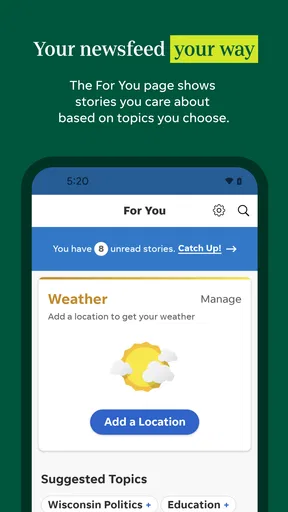
One of the first things I noticed was how customizable the app is. You can tailor the news feed to your interests, which is a huge plus if you’re someone who doesn’t have time to sift through everything. Just set your preferences, and the app does the rest. It’s like having your personal news curator.
The app also offers real-time notifications, so you’re always in the loop. Whether there’s breaking news or updates on your favorite sports team, you’ll get instant alerts. This feature is perfect for those of us who hate missing out on important updates.
Another feature worth mentioning is the app’s offline reading mode. If you’re on the go and don’t have a reliable internet connection, you can download articles to read later. It’s a lifesaver for those long commutes or when you’re stuck waiting in line.
Using the local focus to best advantage
For a reader who lives in Milwaukee, or has family, work or regular interests there, local reporting can be more useful than a larger national feed. A national news app may cover a major story with broad context, while a city paper is the more natural place to look for developments that affect neighborhoods, local institutions and Wisconsin sports conversations. I would use this app as a local layer in a wider news routine, rather than expecting it to replace every source I follow.
A realistic routine might be to check the lead stories over breakfast, save a few pieces for a bus ride, then open the sports coverage after a game or during a quiet break. That is where having a mix of daily news and local sports in one publication can save small amounts of effort: you do not have to start from scratch with separate searches whenever you want to catch up. The eNewspaper is particularly relevant if you prefer a more newspaper-like browse, while a quick visit to the main feed is better when you only have a minute.
One useful habit is to be selective with alerts from the outset. Breaking news can be valuable when a story is changing quickly, but a steady stream of updates can turn a useful app into another source of interruption. I would keep notifications for the topics I genuinely want pushed to me and let everything else wait for a deliberate check-in. That approach is especially helpful if you follow sports: a timely update can matter, but not every development needs to interrupt work or dinner.
User Experience
Let’s talk about user experience. Navigating through the app is super intuitive. The developers did a fantastic job ensuring that everything is within reach without unnecessary clicks. Articles load quickly, and the text is easy to read, which makes for a pleasant reading experience.
One thing I really appreciate is the multimedia content. Videos and photo galleries are seamlessly integrated into the articles, making the news more engaging. It’s not just about reading; it’s about experiencing the story.
How does it compare with the usual alternatives? If your main need is instant headlines from around the world, a broad news aggregator is likely to be more efficient because it pulls together many publishers. If you mainly want national reporting, a national newspaper app may give you a wider lens. This app makes more sense when the Milwaukee angle is the reason you opened a news app in the first place. I would pair it with a broader source when a developing story needs national or international context, rather than asking one local publication to cover everything equally well.
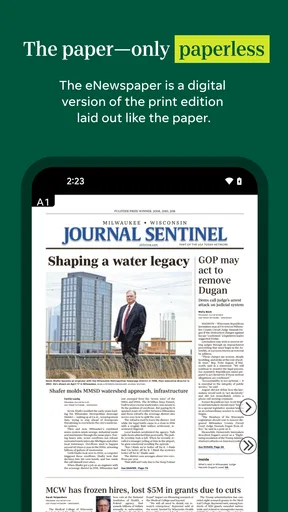
The eNewspaper also changes the kind of reading session the app suits. A feed is good for scanning and following individual stories; a digital newspaper can be a better fit when you want to browse beyond the topics you already know to search for. If you are short on time, start with the feed. If you want a more deliberate catch-up, give the eNewspaper a try and see whether its format feels comfortable on your screen. The right choice is a matter of reading style, not simply which format sounds more complete.
What Could Be Improved?
While the app is pretty solid, there are a couple of areas that could use some fine-tuning. Occasionally, I noticed that the notifications can be a bit overwhelming if you don’t adjust your settings. It’s like having your phone buzz every few minutes, which can get a tad annoying.
Also, while offline reading is a great feature, it would be even better if there were more options for saving multimedia content. Sometimes you just want to watch that game highlight again without needing an internet connection.
There is another practical trade-off to keep in mind: features described as part of the app do not automatically answer what a particular reader can access without paying. Before making it your only source, check whether the stories and eNewspaper sections you care about are available under the access you have. This matters most if you plan to use it every day, since a purchase only offers good value when it covers the kind of reading you actually do.
I would also avoid judging the app solely by a single frustrating moment. A slow connection, an unwanted alert or a story that requires paid access can each affect one session for different reasons. If you are deciding whether it belongs on your phone, test the routines that matter to you: open local coverage, look for the sports material you follow, and see how the eNewspaper fits your preferred way of reading. That tells you more than installing it and glancing at one headline.
Who is likely to get value from it?
I would recommend trying it if Milwaukee news is personally relevant to you and you want one place to check local stories and sports. It may also suit former residents who still follow what is happening in the city, or readers with family and community ties there. For those people, a focused publication can be more useful than a general feed that gives local events only occasional space.
On the other hand, I would skip it if you rarely read local coverage, want a single app for comprehensive world news, or are unwilling to consider paid access if the material you want is not included with the free experience. In those cases, a broad aggregator or a publication focused on your main subject may be a better match. If your priority is only a quick score check, a dedicated sports source may also be more direct than opening a newspaper app.
Readers who enjoy browsing a full digital edition should pay particular attention to the eNewspaper option; people who only want a few targeted headlines may find the feed more relevant. And if notifications tend to distract you, you can still use a news app as an intentional destination rather than allowing it to set your schedule. Choosing when to check in is a simple way to keep local news useful without making it feel constant.
Final Thoughts
Overall, the Milwaukee Journal Sentinel app is a must-have for anyone in Milwaukee or anyone interested in Milwaukee news. It’s packed with features that make staying informed easy and enjoyable. With a few tweaks here and there, it could be even better, but for now, it’s definitely worth the download.
So, if you’re ready to stay connected to Milwaukee’s happenings, head over to your app store and give it a try. Trust me, you won’t regret it!
Pros
- Comprehensive local news coverage.
- User-friendly navigation interface.
- Regular updates with breaking news.
- Customizable notification settings.
- Access to exclusive subscriber content.
Cons
- Some articles locked behind paywall.
- Occasional app crashes reported.
- Limited international news coverage.
- Ads can be intrusive at times.
- Requires stable internet connection.
FAQs for Milwaukee Journal Sentinel
What is the Milwaukee Journal Sentinel app?
The Milwaukee Journal Sentinel app is a mobile platform that brings the latest news, sports updates, and in-depth articles directly to your Android or iOS device. It offers a convenient way to stay informed about local and national events, with customizable notifications and an easy-to-navigate interface for a seamless user experience.
Is the Milwaukee Journal Sentinel app free to use?
The app itself is free to download, but it offers both free and subscription-based content. While some articles and features are available at no cost, accessing premium content or removing ads typically requires a subscription. Users can choose from various subscription plans to fit their reading preferences.
What features does the Milwaukee Journal Sentinel app offer?
The app provides real-time news updates, personalized news feeds, and interactive multimedia content. Users can customize alerts to receive notifications on specific topics, access a comprehensive archive of past articles, and enjoy a user-friendly interface designed for both smartphones and tablets. It also features social sharing options for easy content sharing.
How does the Milwaukee Journal Sentinel app handle user privacy?
The app is committed to user privacy and follows strict guidelines to protect personal information. It requires users to agree to its privacy policy upon installation, detailing how data is collected and used. The app uses this data to enhance user experience but ensures that sensitive information is not shared with third parties without consent.
Can I access the Milwaukee Journal Sentinel app offline?
Yes, the Milwaukee Journal Sentinel app allows users to download articles for offline reading. This feature is particularly useful for those who want to stay informed while on the go without relying on an internet connection. Simply save articles to your device and access them anytime, even when offline.


